Viewing the Status of a Proxy Set
You can view status of proxy servers belonging to a specific Proxy Set.
| ➢ | To view the status of a Proxy Set's servers: |
| 1. | Open the Proxy Sets table (Setup menu > Signaling & Media tab > Core Entities folder >Proxy Sets). |
| 2. | Select the Proxy Set. |
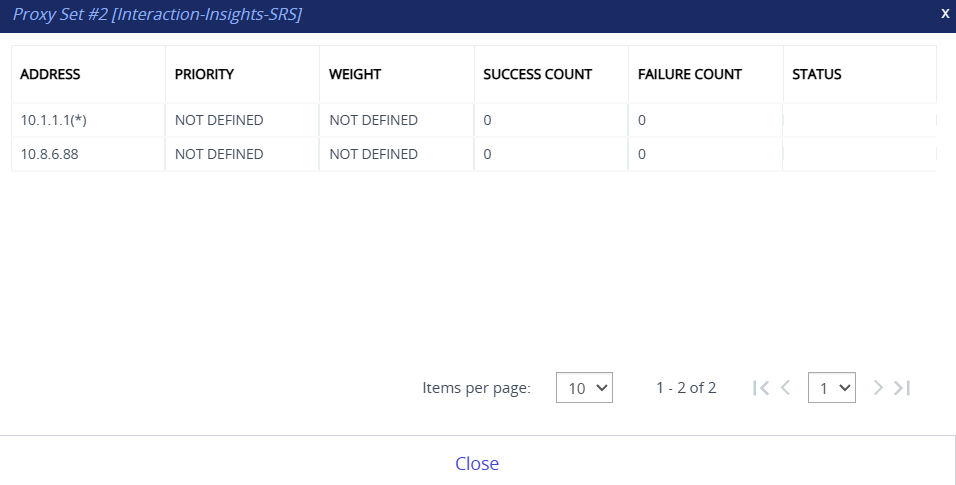
| 3. | From the Action drop-down menu (located above the table), choose Status; the following read-only dialog box appears: |
Status Description
|
Parameter |
Description |
||||||||||||
|---|---|---|---|---|---|---|---|---|---|---|---|---|---|
|
Address |
Displays the IP address of the proxy server. This can be the IP address as configured in dotted-decimal notation for the Proxy Set, or the resolved IP address of a DNS query if an FQDN is configured for the Proxy Set.
|
||||||||||||
|
Priority |
Displays the priority of IP addresses resolved from FQDNs. Note: The field is applicable only to Proxy Sets configured with FQDNs. |
||||||||||||
|
Weight |
Displays the weight of IP addresses resolved from FQDNs. Note: The field is applicable only to Proxy Sets configured with FQDNs. |
||||||||||||
|
Success Count |
Displays the total number of successful keep-alive messages (by SIP OPTIONS) sent by the device to the proxy server. |
||||||||||||
|
Failure Count |
Displays the total number of failed keep-alive messages (by SIP OPTIONS) sent by the device to the proxy server. |
||||||||||||
|
Status |
Displays the connectivity status of the proxy server, which is determined by keep-alive messages:
Note: The status is also "ONLINE" for IP addresses resolved from DNS queries even if keep-alive is disabled.
|